








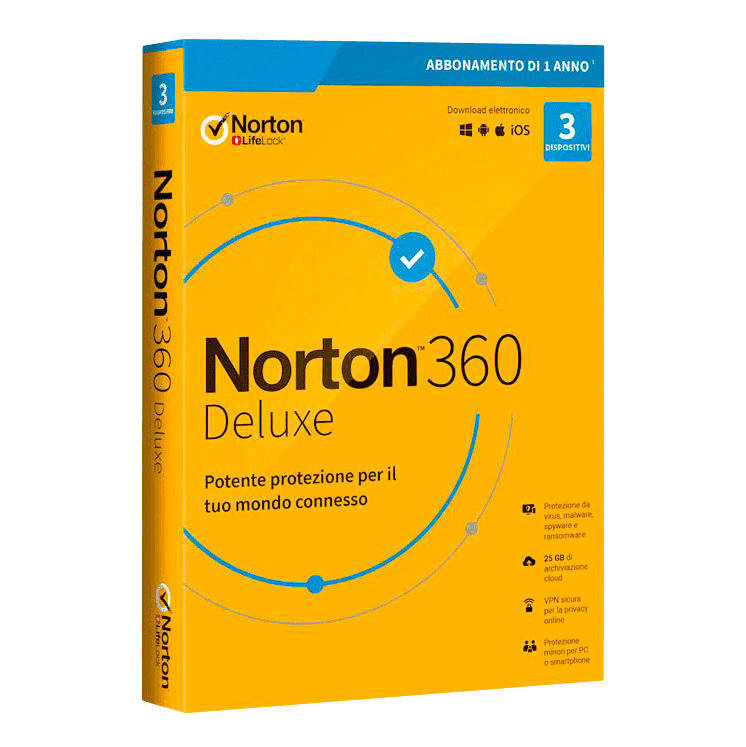

Norton 360 Deluxe

Trusted Shops
Buyer Protection guaranteed refund
Norton 360 Deluxe Original Annual License for Windows, Mac, Android and iOS
Trusted Shops Guarantee, Fast Email Delivery and Technical Support Included
Available for 1, 3, 5 or more devices and in different durations: select the variant you need among those on this page.
| Language | Italian, Multi-Language |
|---|---|
| License Duration | Annual (renewable) |
| Operating System | Windows, macOS, Android and iOS |
| Users | according to the chosen variant |
Norton 360 Deluxe is Norton's complete security suite: in a single license for Windows, macOS, Android and iOS it covers three things usually bought separately: the defence of the devices, the unlimited VPN for the network and the cloud backup of the documents you care about. It is the choice of families and professionals wanting one product to cover devices, data and identity. The license is annual and is delivered by email with the activation code.
Why choose Norton 360 Deluxe
The difference between an antivirus and a suite like Norton 360 lies in the number of fronts covered. An antivirus defends the device against harmful programs, but it does not prevent a disk failure taking years of documents with it, does not encrypt the connection on public wi-fi and does not warn you if credentials end up in a breached archive.
Norton 360 Deluxe addresses these scenarios together: cloud backup keeps a copy of important files outside the computer, the VPN protects the connection even on networks you do not control and dark web monitoring flags when your data appears where it should not. Backup in particular is the most effective defence against ransomware, because it makes the blackmail pointless.
What Norton 360 Deluxe is and what it is for
Norton 360 Deluxe brings device protection and data protection together in a single license. The antivirus engine works on several levels, recognising both known harmful files and suspicious behaviour in running processes, and the smart firewall adapts its rules to the network the computer is connected to.
Alongside protection are the tools for personal data: the cloud backup space automatically keeps a copy of the documents you choose, the VPN encrypts the connection with no traffic limits, the password manager guards credentials in an encrypted vault and dark web monitoring warns when your data appears in a breached archive. Parental controls complete the coverage for families.
Cloud backup: what is worth saving and what is not
- Documents first, not photographs
Contracts, tax returns, invoices and theses take up a few gigabytes and are irreplaceable. Photographs are usually already on the phone and in another service: they come after, not before. - What can be downloaded again is not backed up
Programs, installers, films and purchased music can be got back from their stores. They take up the space needed by the things that exist in a single copy. - One copy in the cloud is not one copy only
The rule that works is three copies, on two different media, one of them away from home. The cloud is the one away from home: on its own it is not enough, with an external disk it is. - The automatic backup has to be checked
A scheduled backup that has not run for three months is worse than no backup, because it gives a safety that is not there. Once a month you look at the date of the last successful copy. - Restoring is tested when you do not need it
Recovering a file at random and opening it is the only way to know the system works. Trying it on the day of the failure is too late. - Against ransomware, version history is what counts
If the service keeps previous versions, an encrypted file is recovered as it was yesterday. If it keeps only the latest, the encrypted copy replaces the good one and the backup is no longer any use. - Space runs out sooner than it seems
Working folders grow by themselves. It pays to choose what to include instead of enabling everything and finding out in six months that the backup stopped for lack of space. - What does not end up in the backup
Passwords saved in the browser, program settings and activated licenses are not copied. They have to be written down separately, otherwise on restore the files are there but nothing opens.
Feature overview of Norton 360 Deluxe
| Feature | Included |
|---|---|
| Automatic isolation of suspicious files | ✔ |
| Alert if a saved password appears in a data leak | ✔ |
| Reporting of programs that ought to be updated | ✔ |
| Management of the programs that start at switch-on | ✔ |
| Cleaning of temporary files and history | ✔ |
| Browser extension that rates the search results | ✔ |
| Silent mode during games and presentations | ✔ |
| A single console for all the protected devices | ✔ |
Comparison: traditional antivirus and Norton 360 Deluxe
| Feature | Traditional antivirus | Norton 360 Deluxe |
|---|---|---|
| Antivirus and ransomware protection | ✔ | ✔ |
| Firewall and safe browsing | ✔ | ✔ |
| VPN with no traffic limits | ✘ | ✔ |
| Cloud backup of important files | ✘ | ✔ |
| Password manager | ✘ | ✔ |
| Parental controls | ✘ | ✔ |
| Dark web monitoring | ✘ | ✔ |
| Protection of several devices with one license | Rarely | ✔ |
System requirements
Norton 360 Deluxe is compatible with Windows, macOS, Android and iOS: the license covers devices on different systems. For detailed requirements see the "Requirements" tab on the product page.
Why are licenses priced so low?
As these are retail licenses previously owned and decommissioned by the former holder in accordance with EU Court ruling C-128/2011, they can be purchased at a more affordable price. These official licenses are fully compliant and guaranteed at the best price on the market.
What do I receive after purchase?
By purchasing this product you will receive the official download of the software from the Norton website, the license for activation and complete instructions for a correct installation.
Advantages of the Licensel License
- Fast delivery by email
You receive the license and the download link within a few minutes of your order. - Always free support
Our technicians assist you via Live Chat and email, at no additional cost. - Invoice included
The invoice is issued automatically once the purchase is complete. - Trusted Shops guarantee
Licensel is a Trusted Shops partner shop: every order is covered by the official buyer guarantee.
How to buy and activate
- Choose your edition
Select the version you need and complete your order in a few clicks. - Receive the license by email
Within a few minutes you receive the official download link and the license for activation. - Install and activate
Download the software from the manufacturer's official website and enter the license to complete activation. - Support included
For any question our technicians are available via Live Chat and email.
How to download and install Norton 360 Deluxe
After purchase you receive the activation code and the official download link by email. Download Norton 360 from the norton.com website, install it and enter the code you received at first launch: protection starts immediately and the program automatically downloads definition updates. To protect smartphones and tablets too, simply install the app and sign in with the same account. If you prefer to be guided step by step, our technicians can assist you during installation.
Need help with installation?
No problem: our technicians are available via the Live Chat at the bottom right of the website to assist you in real time.
Frequently asked questions
What is the difference from Norton Secure VPN?
How much cloud backup space is included?
Does backup protect against ransomware?
How is the license activated?
Can I protect smartphones and tablets too?
DIGITAL Delivery
Guaranteed instant delivery
Customer Support
Always available.
Money-back guarantee
Total satisfaction guarantee.
TrustedShops
Buy with certified confidence.