

















Template Excel Client Tracker

Trusted Shops
Buyer Protection guaranteed refund
Excel Client Tracker Template Ready to Use
Trusted Shops Guarantee, Fast Email Delivery and Technical Support Included
| Language | Italian, Multi-Language |
|---|---|
| Access | Files yours forever |
| Compatibility | Microsoft Excel |
| Format | Spreadsheet .xlsx |
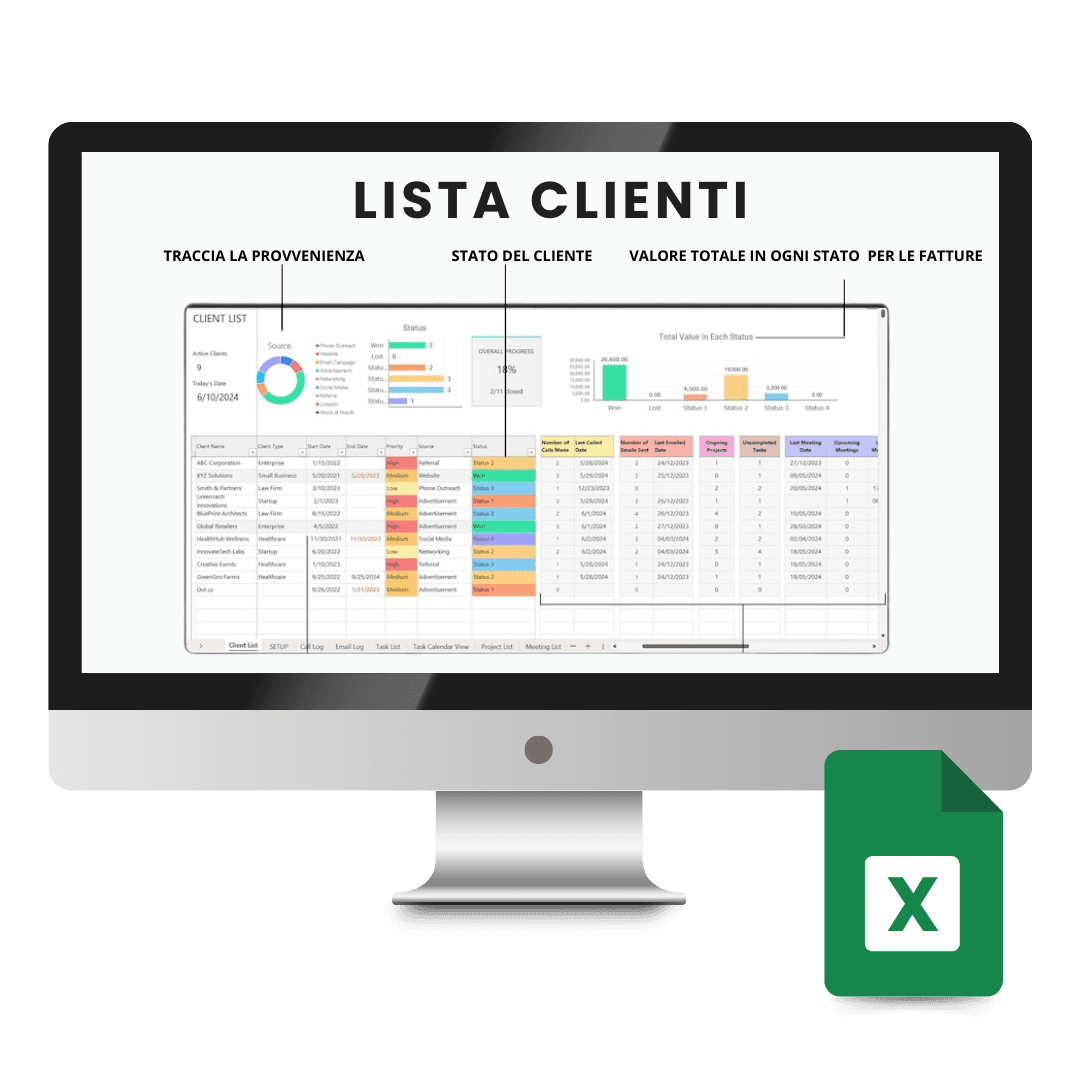
Excel Client Tracker Template is the ready-made spreadsheet for keeping track of clients, activities and deadlines without installing a CRM. Client records, activity log, follow-ups and automatic summaries are already set up: you simply replace the sample data with your own. It is designed for freelancers, agencies and small businesses. The file is yours forever.
Why choose Excel Client Tracker Template
A client management system makes sense when contacts run into the thousands and the team is large. For a professional or a small business the monthly cost and setup time are often out of proportion to the real need, which is knowing who called, what was promised and when to call back.
This template solves exactly that need in Excel, a program already installed that everyone can use at least a little. Formulas and charts are already set up, so the work comes down to entering data: there is nothing to configure and nothing to learn beyond what you already know.
What Excel Client Tracker Template is and what it is for
The Excel Client Tracker Template gathers in a single file the client records, the log of what was done for each and the deadlines to meet. Every row records an activity with date, client, description and outcome, while the summaries update by themselves as the log fills up.
The sheets are linked to each other: adding a client to the records makes them appear in the drop-down lists of the other sheets, with no need to retype the name. Charts show the activity trend and client distribution, while filters quickly isolate deals under way or contacts to call back this week.
How to keep a growing client archive in order
- One row per client, always
As soon as you start putting two contacts on the same row, filters and summaries stop working. It is the rule everything else rests on. - Merged cells are the main enemy
They make the sheet prettier and break it: sorting and pivot tables get stuck. To centre a heading there is an option that merges nothing. - Dates have to be written as dates
If the column contains text, you cannot sort by date nor work out how many days have passed. You check it once at the start and never think about it again. - A client is not deleted, it is archived
Removing the row also loses the history of the linked activities. A column with the status active or closed keeps everything and takes the name out of the lists. - The column always missing is where they came from
Knowing whether a client came from word of mouth, a trade fair or the website is the information that in a year's time will say where it is worth investing. - You collect the data you need, not all the data you can
An archive full of useless personal information is a risk to manage. Name, contact and what you did together are almost always enough. - The file has to be copied elsewhere every week
A spreadsheet on the computer's disk alone is a client archive at risk. A copy on an external disk or on the network costs thirty seconds. - What this file is not
It is not a management program: it does not send emails by itself, it does not invoice and it does not connect to the accounts. It keeps the information in order, and it does so with no fees.
Contents of Excel Client Tracker Template
- Client recordsContact details, contacts and notes for each client
- Activity logWhat was done for each client and when
- Deadlines and follow-upsReminders of contacts to call back and pending actions
- Deal statusProgress of quotations and proposals under way
- Summary by clientTotal activities, value and last contact
- Automatic chartsActivity trend and client distribution
- Filters and searchQuick selection by status, contact or period
Comparison: the Licensel templates compared
| Template | Area | Program | Ideal for |
|---|---|---|---|
| Excel Client Tracker | Client and activity management | Excel | Freelancers and agencies |
| Excel Company Accounting | Monthly and annual accounting | Excel | Small businesses and craftspeople |
| Excel Project Management | Project planning and progress | Excel | Project managers and teams |
| PowerPoint Business Presentation | Presentations and pitches | PowerPoint | Anyone presenting to clients and investors |
| AutoCAD Template Pack | Interior design drawing sets | AutoCAD and AutoCAD LT | Architects and interior design studios |
| Access | Files yours forever | No expiry | No renewal |
| Customisation | Complete | Colours, logos and entries | No limits |
Compatibility
The Excel Client Tracker Template opens with Microsoft Excel on Windows and macOS and remains compatible with the main alternative spreadsheets. For details see the "Requirements" tab on the product page.
What do I receive after purchase?
By purchasing this product you receive by email the link to download the files, together with the instructions to open and customise them. The files are yours forever: no expiry, no renewal, no activation to perform.
Advantages of buying on Licensel
- Fast delivery by email
You receive the download link within a few minutes of your order. - Files yours forever
You buy once: the files stay yours, with no expiry and no renewals. - Always free support
Our technicians assist you via Live Chat and email, at no additional cost. - Invoice included
The invoice is issued automatically once the purchase is complete. - Trusted Shops guarantee
Licensel is a Trusted Shops partner shop: every order is covered by the official buyer guarantee.
How to buy and download
- Add to basket
Complete your order in a few clicks, with no complicated registration. - Receive the link by email
Within a few minutes you receive the link to download the files to your computer. - Open and customise
Open the file with the indicated program and replace the sample data with your own. - Support included
For any question our technicians are available via Live Chat and email.
Need help?
No problem: our technicians are available via the Live Chat at the bottom right of the website to assist you in real time.
Frequently asked questions
Does it replace a client management system?
Do I need to know Excel?
Can I add my own columns?
Do I need a license or an activation code?
Can I customise it with my own data?
DIGITAL Delivery
Guaranteed instant delivery
Customer Support
Always available.
Money-back guarantee
Total satisfaction guarantee.
TrustedShops
Buy with certified confidence.





















